
The Cube Framework is a toolset for displaying, analyzing, and processing performance data from parallel application runs. It consists of the components CubeGUI (the visual interface), CubeLib (the core data library and command-line utilities), CubeW (the C writer library), and jCubeR (the Java reader library). A key feature is its three-dimensional, hierarchical data model, which combines performance metrics, call paths, and system resources. This data layout allows examining performance data on different levels of detail to identify performance bottlenecks. Custom analyses are supported by user-defined metrics and GUI plugins.
Recommended reading
To learn more about the general analysis approach and architecture of Cube, please see:
P. Saviankou, M. Knobloch, A. Visser, and B. Mohr.
Cube v4: From Performance Report Explorer to Performance Analysis Tool.
Procedia Computer Science 51, pp. 1343–1352. 2015.
DOI: 10.1016/j.procs.2015.05.320
Core features
The Cube Framework focuses on performance profiles generated by measurement systems like Score-P or automatic trace analyzers such as the Scalasca Trace Tools. It provides the following core features:
- Three-dimensional, hierarchical data model
Cube structures performance data across three dimensions: metrics, call paths, and system locations. The elements of each dimension can further be organized hierarchically. This allows users to map recorded performance issues precisely to their origin, which CubeGUI then visualizes interactively. - Multi-dimensional performance exploration
Users can navigate through complex execution profiles and inspect performance behavior across all three dimensions simultaneously. - Derived metrics and CubePL
Using a domain-specific language called CubePL, users can define and calculate custom performance metrics. - Extensible GUI plugin architecture
CubeGUI includes a plugin interface that allows developers to add new visualizations, loop-level analysis tools, or graph renderers without changing the core codebase. - Profile manipulation tools
A set of command-line tools enables operations on performance profiles, such as combining, comparing, scaling, or merging reports from multiple runs. - Remote data access
Through a client-server approach, users can connect to remote performance archives over the network using CubeGUI, enabling direct analysis without the need to copy large data files. - Browser & JupyterLab integration
Using WebAssembly support, Cube can be integrated into JupyterLab environments, allowing users to access and analyze performance measurements directly within a web browser.
Analysis workflow
The Cube Framework uses CUBE4 performance report archives (.cubex) as input. These profiles are created directly during execution by the Score-P measurement system or generated as enriched output by the Scalasca Trace Tools analyzer.
A typical performance evaluation workflow consists of the following steps:
- Initial profiling and overhead estimation
After running an application instrumented by Score-P to generate an initial summary profile (profile.cubex), usescorep-scoreto analyze the profile. This estimates trace buffer requirements and helps create filter files to exclude small, frequently called routines to reduce measurement overhead and the size of collected traces. - Sanity checking and textual inspection
Usecube_sanityto check that stored metric data is valid. You can then usecube_regioninfoto inspect flat profiles, examine routine classifications, and view specific metrics directly from the command line. - Metric remapping and heuristics
Applycube_remapto reorganize and refine measured execution timings, enabling a fine-grained separation of metrics and calculating additional useful performance heuristics. - Algebraic post-processing
When comparing runs or combining data across configurations, use the profile algebra tools:cube_mergeto combine performance data or overlapping metric dimensions from multiple files.cube_diffto calculate differences between a baseline and an optimized run, showing where execution time changed.
- Interactive report exploration
Load.cubexfiles into CubeGUI (cube) to interactively explore the three-dimensional performance tree, evaluate user-defined CubePL metrics, and use custom plugins to isolate bottlenecks.
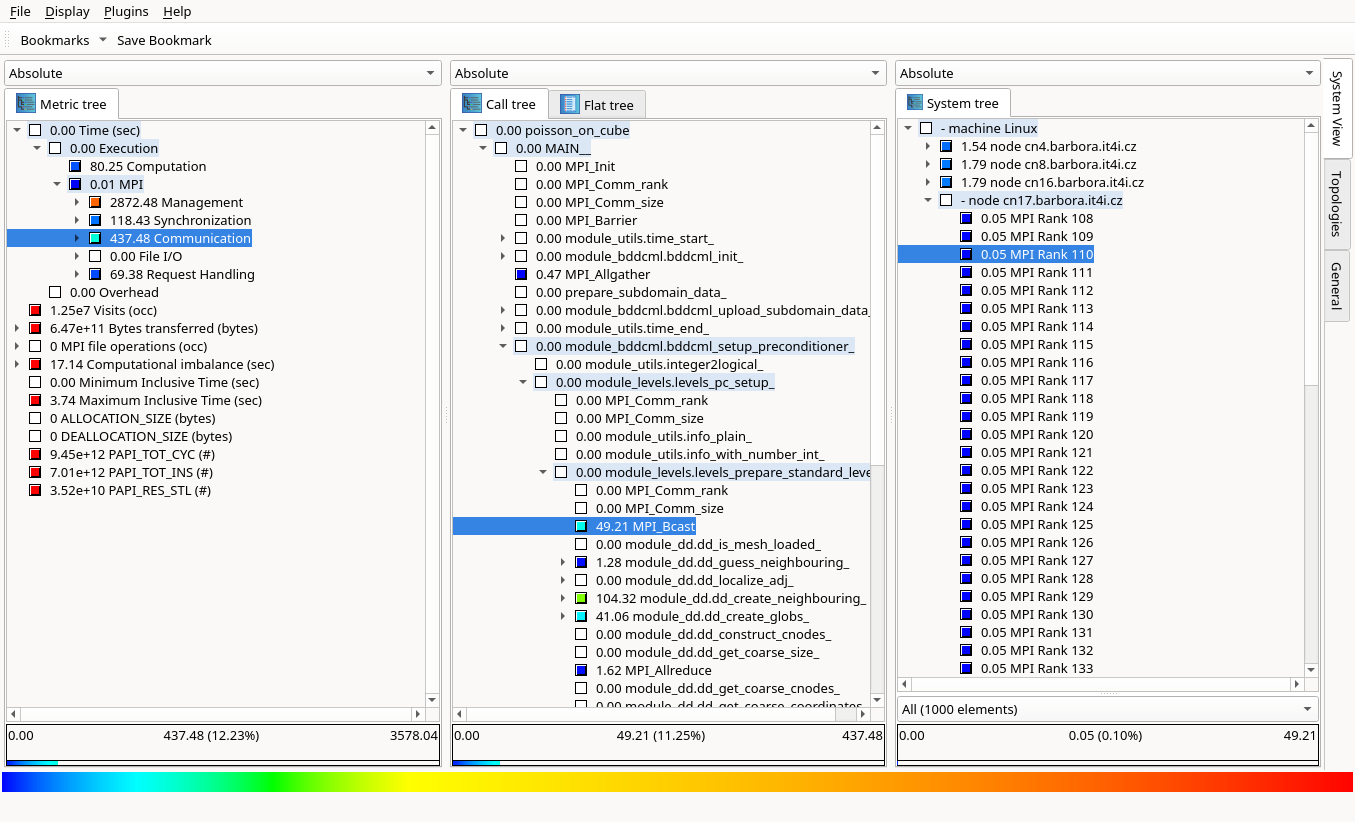
Example of a performance measurement result in CubeGUI
Recommended citations
If you find the Cube Framework helpful for your research, please reference it in your publications. To cite the Cube Framework in general, please use the following publication:
- Saviankou, P. et al. (2015).
Cube v4: From Performance Report Explorer to Performance Analysis Tool.
Procedia Computer Science 51, pp. 1343–1352.
DOI: 10.1016/j.procs.2015.05.320
When referring to specific topics or components, please use one (or more) of the following:
-
Cube architecture & CubePL:
Saviankou, P. et al. (2015).
Cube v4: From Performance Report Explorer to Performance Analysis Tool.
Procedia Computer Science 51, pp. 1343–1352.
DOI: 10.1016/j.procs.2015.05.320 -
Cube plugins:
Knobloch, M., Saviankou, P., Schlütter, M., Visser, A., and Mohr, B. (2021).
A Picture Is Worth a Thousand Numbers—Enhancing Cube’s Analysis Capabilities with Plugins.
In: Mix, H., Niethammer, C., Zhou, H., Nagel, W.E., Resch, M.M. (eds) Tools for High Performance Computing 2018 / 2019, pp. 237–259. Springer, Cham.
DOI: 10.1007/978-3-030-66057-4_13